

Running in production
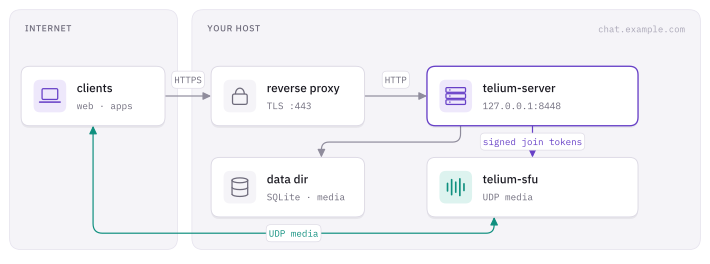
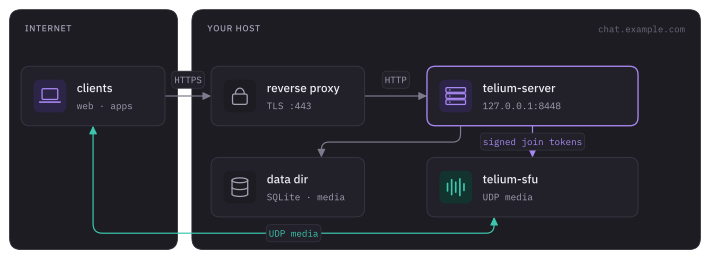
This page takes one homeserver from a binary to a public HTTPS domain: installing it, the settings you must change, the startup audit, the reverse proxy, storage and shutdown. Voice and video media run on a separate SFU, covered in SFU.
Install
Section titled “Install”Pick one of three paths. All of them run the same telium-server binary.
Container
Section titled “Container”The image is ghcr.io/telium-chat/telium. It runs as uid 10001 on a read-only root, listens on 8448 and has a health check against /_telium/v1/health.
| Tag | Meaning |
|---|---|
server-latest |
The highest server-v* release. Moves on every release. |
server-v<version> |
One release, for example server-v0.2.0. |
@sha256:… |
One exact build. |
The entrypoint is telium-server --config /etc/telium/telium.toml, so mount your config there read-only. Mount /var/lib/telium for data and a separate path at /var/backups/telium for archives.
The repository’s deploy/ directory is a complete single-box kit: compose.yml (the server plus a cloudflared tunnel container on a small private network), update.sh and its systemd timer, and install.sh:
sudo ./deploy/install.shIt installs to /opt/telium, creates /srv/telium-backups owned by uid 10001, installs the systemd units and enables telium-update.timer. Running it again upgrades the scripts and units and leaves compose.yml, telium.toml, update.conf and tunnel.env alone. Run it with sudo from an ordinary account: that account owns the deploy, and the script refuses to make it root. Set TELIUM_RUN_AS=<user> to name a different one. The box needs systemd.
You still place two credentials yourself:
# The Cloudflare tunnel token. Never commit it.printf 'TUNNEL_TOKEN=%s\n' "$TOKEN" > /opt/telium/tunnel.envchmod 600 /opt/telium/tunnel.env
# A registry login, if your image source needs one. Pipe the token in.docker login ghcr.io -u <user> --password-stdin
telium-update.service runs as the account that ran docker login, so the pull finds that account’s ~/.docker/config.json. Automatic updates are covered in Updates.
Native (systemd)
Section titled “Native (systemd)”Each release also ships a static Linux binary for x86_64 and aarch64. Install it with the unit in deploy/telium-server.service:
install -Dm755 telium-server /usr/local/bin/telium-serveruseradd --system --home-dir /var/lib/telium --shell /usr/sbin/nologin teliuminstall -d -o telium -g telium -m 750 /var/lib/teliuminstall -d -o telium -g telium -m 700 /var/backups/teliuminstall -d -m 755 /etc/teliuminstall -o telium -g telium -m 600 telium.toml /etc/telium/telium.tomlinstall -Dm644 telium-server.service /etc/systemd/system/telium-server.servicesystemctl daemon-reload && systemctl enable --now telium-serverThe unit runs telium-server check as ExecStartPre, drops all capabilities, makes the filesystem read-only apart from /var/lib/telium and /var/backups/telium, sets LimitNOFILE=65536 and TimeoutStopSec=30, and restarts on failure (five tries in five minutes, then it stays down). It has commented LoadCredential= lines for handing secrets over as files.
From source
Section titled “From source”git clone https://github.com/telium-chat/telium.gitcd telium/servercargo build --release --bin telium-server./target/release/telium-server init --config telium.tomlinit writes a config with every default. Treat it as a starting point, not a hardening checklist.
Settings you must change
Section titled “Settings you must change”# The name in account ids (@alice:chat.example.com). Permanent: changing it later strands every account.server_name = "chat.example.com"# The HTTPS origin clients and other servers reach.public_base_url = "https://chat.example.com"# Keep the listener private behind a proxy or tunnel.bind = "127.0.0.1:8448"database_url = "sqlite:///var/lib/telium/telium.db?mode=rwc"media_dir = "/var/lib/telium/media"
[rate_limit]trusted_proxies = ["127.0.0.1"]
[backup]dir = "/var/backups/telium/archives"key_file = "/var/backups/telium/backup.key"server_name and public_base_url can differ: the first is an identity, the second is where the server is reached. See Configuration for the rest.
Audit the config: telium-server check
Section titled “Audit the config: telium-server check”telium-server --config /etc/telium/telium.toml check [--strict]check parses and audits the config without opening the database, binding a port or writing anything, so it is safe beside a running server. It exits 1 on any danger finding, and with --strict on warnings too. serve runs the same audit at startup and only logs it.
The profile key (auto, production, development) sets how loud the audit is and changes no behaviour. auto infers the profile from public_base_url. Several findings below apply only in the production profile.
| Level | Finding |
|---|---|
| Danger | server_name is localhost or has no dot |
| Danger | public_base_url is unparseable, loopback, or http:// |
| Danger | bind is a wildcard and public_base_url is not https |
| Danger | federation.allow_http = true |
| Danger | registration.open with no registration.admins |
| Danger | rate_limit.enabled = false |
| Danger | backup.dir is inside the database directory or media_dir |
| Danger | the process runs as uid 0 |
| Danger | the backup key file, or a config holding literal secrets, is readable by others |
| Warning | wildcard bind behind an https proxy with no rate_limit.trusted_proxies |
| Warning | registration.min_password_len below 8 with open registration |
| Warning | backup.enabled or backup.remote.enabled is off |
| Warning | no web client (web.dir) |
| Notice | updates.check = false, literal secrets in the file, leftover rotation keys |
Startup also refuses group- or world-writable config, database and key files, and refuses any value still equal to an example placeholder such as change-me.
Reverse proxy
Section titled “Reverse proxy”Examples for nginx and Caddy are in deploy/reverse-proxy/. Whatever you use, the proxy must:
- pass WebSocket upgrades on all paths;
- allow a read timeout above 90 seconds (the gateway heartbeat is 45 s; the examples use 600 s);
- send
X-Forwarded-For, and you must list the proxy’s address inrate_limit.trusted_proxies; - accept request bodies of at least 128 MB;
- leave out its own Content-Security-Policy, since the server sends one.
nginx and Certbot
Section titled “nginx and Certbot”sudo apt install nginx certbot python3-certbot-nginxsudo certbot --nginx -d chat.example.comCopy deploy/reverse-proxy/nginx.conf into a site, replace telium.example.org with your hostname, keep the upstream at http://127.0.0.1:8448, then:
sudo nginx -t && sudo systemctl reload nginxThe example also redirects HTTP to HTTPS, disables response buffering and adds per-IP request limits with a tighter zone for /_telium/v1/auth/.
Cloudflare Tunnel
Section titled “Cloudflare Tunnel”A tunnel carries HTTP and WebSockets, which is all the homeserver needs. Map chat.example.com to the server’s address and run cloudflared on the same host or, as deploy/compose.yml does, as a container on the server’s private network. List the tunnel container’s address in trusted_proxies.
The server does not watch certificate expiry. Monitor it yourself.
Storage
Section titled “Storage”| Path | Holds | Notes |
|---|---|---|
/var/lib/telium |
database, media, cold archive, caches | The data. |
/var/backups/telium |
archives, backup key | On a different mount from the data, plus [backup.remote]. |
/etc/telium/telium.toml |
config | Mode 600. |
Point backup.dir and backup.key_file outside the data. A backup inside the data volume disappears with it. See Backups.
Secrets
Section titled “Secrets”Any string value in telium.toml can be "${file:/run/secrets/name}" (preferred) or "${env:NAME}". See Secrets.
Web client
Section titled “Web client”The server can serve a built web client after its API and discovery routes, so a file in the web root cannot shadow /_telium paths:
cd web && bun install && bun run build[web]dir = "../web/dist"# Only if the client lives on a different origin:# client_url = "https://chat.example.com"Users can also sign in through any other Telium client, so this is optional.
Stopping
Section titled “Stopping”On SIGTERM the server refuses new sockets, closes gateway sockets with code 4005, waits shutdown.settle_ms (250), then gives in-flight HTTP requests up to shutdown.grace_secs (15) before exiting. Your supervisor must wait longer: the systemd unit uses TimeoutStopSec=30 and compose.yml uses stop_grace_period: 20s. Raise those if you raise grace_secs.
Verify
Section titled “Verify”curl -fsS https://chat.example.com/.well-known/telium/servercurl -fsS https://chat.example.com/_telium/v1/capabilitiesThen open a Telium client, register on chat.example.com, and create a guild.
Build identity
Section titled “Build identity”telium-server version prints the build as key=value lines without reading a config. The same version and commit appear in the startup log and in GET /_telium/v1/admin/version. dev means no commit was recorded at build time.
Troubleshooting
Section titled “Troubleshooting”| Symptom | Check |
|---|---|
| Clients cannot connect | public_base_url, HTTPS, and WebSocket forwarding through the proxy or tunnel |
| Every user shares one rate limit | the proxy is missing from rate_limit.trusted_proxies |
| Uploads fail with 413 | the proxy’s body limit |
| Discovery fails | server_name must match in the config, the SFU trust entry and the discovery document |
| A second process will not start | one process per database is enforced; see Configuration |