

Quick start
This page gets a homeserver and the web client running locally, then shows the minimum changes to serve it on your own domain. For a hardened deployment, continue with Production.
How it compares
Section titled “How it compares”Telium has Discord’s guild model on servers you run, federated like Matrix, with DMs encrypted end to end.
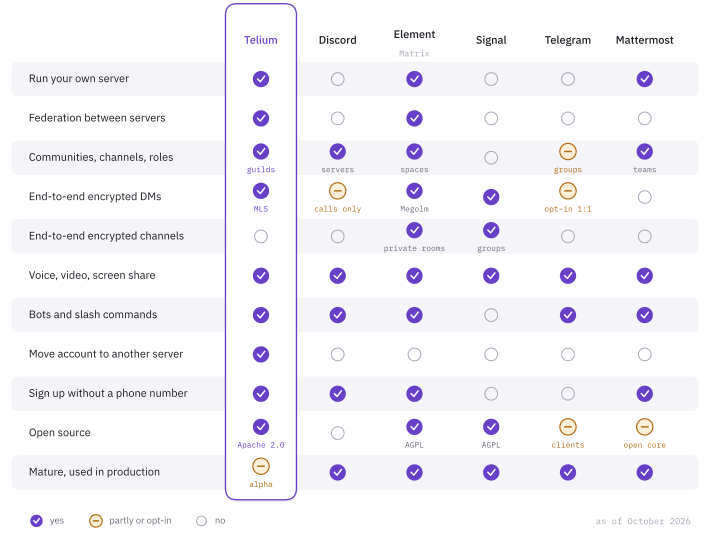
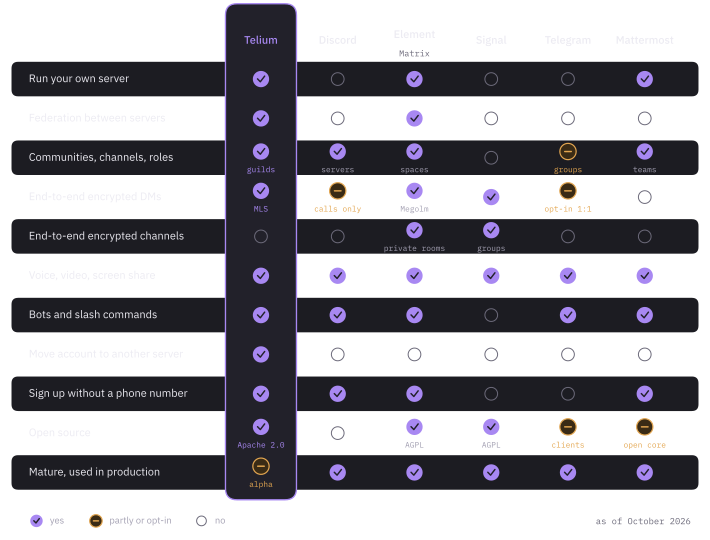
Telium is alpha. The others have years of production use, audits and polished apps. If you need encrypted community channels today, use Matrix or Signal groups.
Requirements
Section titled “Requirements”- Rust 1.85 or newer
- Bun
- Git
Run it locally
Section titled “Run it locally”Start the homeserver:
git clone https://github.com/telium-chat/telium.gitcd telium/servercargo run -- init # writes telium.tomlcargo run -- serve # listens on 127.0.0.1:8448In a second terminal, start the client:
cd telium/webbun installbun run dev # http://localhost:5173The Vite dev server proxies API, discovery and gateway paths to http://localhost:8448. Set TELIUM_ORIGIN to point it at another homeserver.
Open http://localhost:5173 and register. The first account on a fresh server becomes its administrator. To name administrators explicitly instead, list their localparts in registration.admins.
Go public
Section titled “Go public”You need a domain with DNS pointing at your host, and a TLS-terminating reverse proxy in front of the server.
1. Build
Section titled “1. Build”cd web && bun run buildcd ../server && cargo build --release --bin telium-server2. Configure
Section titled “2. Configure”Edit server/telium.toml. These are the values to change for an internet-facing server:
# Appears in every account ID (@alice:chat.example.com). Pick it once.server_name = "chat.example.com"
# The HTTPS URL clients and other servers use. Published at /.well-known/telium/server.public_base_url = "https://chat.example.com"
# Stay on loopback behind the proxy.bind = "127.0.0.1:8448"
# Persistent storage for the database and uploads.database_url = "sqlite:///var/lib/telium/telium.db?mode=rwc"media_dir = "/var/lib/telium/media"
[web]dir = "../web/dist"
[rate_limit]# The proxy's address, so rate limits apply to the real client.trusted_proxies = ["127.0.0.1"]
web.dir is relative to the process’s working directory. Comment it out to run headless. If you host the client on a different origin, set web.client_url.
Any string value can be "${env:NAME}" or "${file:/path}". Use that for secrets. See Secrets.
server/telium.example.toml lists every option with its default. Configuration covers the important ones.
3. Put a proxy in front
Section titled “3. Put a proxy in front”The repository ships two proxy configs. Replace telium.example.org with your domain and keep the upstream at 127.0.0.1:8448.
| File | Notes |
|---|---|
deploy/reverse-proxy/Caddyfile |
Caddy fetches certificates and proxies WebSockets with no extra config. |
deploy/reverse-proxy/nginx.conf |
Preserves WebSocket upgrades, turns off buffering for the gateway, allows 128 MB uploads, redirects HTTP to HTTPS. Pair it with Certbot. |
A Cloudflare Tunnel also works for the homeserver, since it carries HTTP and WebSocket traffic. It cannot carry SFU or TURN media, which need UDP.
4. Check and start
Section titled “4. Check and start”cd server./target/release/telium-server check --config telium.toml./target/release/telium-server serve --config telium.tomlcheck audits the config for settings that would expose a production server and exits non-zero if it finds any. It opens no database and binds no port, so it is safe to run against a live server. Add --strict to fail on warnings too.
For a persistent install, use the systemd unit in deploy/telium-server.service. It runs check as ExecStartPre.
Verify from another machine:
curl -fsS https://chat.example.com/.well-known/telium/servercurl -fsS https://chat.example.com/_telium/v1/capabilities5. Close registration
Section titled “5. Close registration”Create your account first, then close sign-ups if the server is private:
[registration]open = falseVoice and video
Section titled “Voice and video”Calls work without extra setup. With no SFU configured, the server uses peer-to-peer mesh for up to voice.mesh_max_participants people (default 4).
For larger calls, add an SFU and point a voice region at it:
[voice]default_region = "local"
[[voice.regions]]name = "local"sfu = "https://sfu.example.com"
The SFU needs its own public address with UDP ports open. See SFU.
Some network pairs (symmetric NAT, many corporate networks) need a TURN relay. Set both voice.turn (host:port, reachable on UDP) and voice.turn_secret (matching coturn’s static-auth-secret). Setting only one does nothing, and the server warns at startup.
Troubleshooting
Section titled “Troubleshooting”| Symptom | Check |
|---|---|
| Client cannot connect | public_base_url, HTTPS, and WebSocket forwarding through the proxy or tunnel |
| Discovery fails | server_name matches what /.well-known/telium/server returns |
| All clients share one rate limit | Add the proxy’s address to rate_limit.trusted_proxies |
| Calls stay on mesh | A voice.regions entry has a non-empty sfu URL and default_region names it |